NinjaStrike: Bringing High-Impact Energy to Your Design Workflow
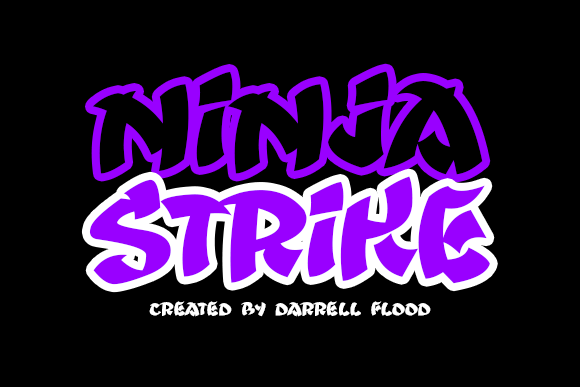
When you need a typeface that commands attention, NinjaStrike delivers. Created by Darrell Flood, this energetic, high-impact font draws inspiration from Japanese culture and features a distinctive overlapping stroke treatment. It is not a subtle font, nor is it meant to be. NinjaStrike is built for moments when your message needs to cut through visual noise, assert presence, and communicate intensity without apology. Understanding where and how to deploy such a strong tool within a broader workflow is essential for getting the most out of it.
What NinjaStrike Is and Where It Belongs
NinjaStrike is a display typeface designed for maximum visual force. The overlapping strokes create a sense of motion, depth, and layered structure, evoking the precision and discipline associated with Japanese aesthetics. This is not a body text font. It is a specialized asset for headlines, titles, logos, posters, and any context where a single line of text carries the weight of the entire composition. In a practical workflow, NinjaStrike functions as a strategic accent piece, not the foundation. Knowing when to bring it into a project is a matter of understanding your message and the emotional response you want to trigger.
The font sits squarely in the realm of branding, editorial design, motion graphics, and product packaging. Its natural energy makes it ideal for campaigns centered on action, strength, focus, or transformation. If you are working on a project that requires a sense of forward momentum or disciplined power, NinjaStrike can serve as the visual anchor that ties the entire piece together.
Using NinjaStrike Before the Project Starts
Early in the planning phase, you have an opportunity to decide whether this font aligns with your core concept. Before you open your design software, take time to articulate the emotional tone you want to convey. If the brief calls for calm, minimalism, or understated elegance, NinjaStrike may overwhelm the message. However, if the goal is to project energy, urgency, authority, or cultural resonance, the font becomes a strong candidate.
During concept development, consider how NinjaStrike interacts with other design elements. The overlapping strokes create texture and visual density, which means you will want to pair it with cleaner, simpler supporting typefaces. Sans-serif fonts with generous letter spacing often work well as secondary options. Prepare by gathering reference materials that blend high-impact typography with restrained layouts, so you have a visual benchmark before you start executing.
Another pre-project consideration is licensing and file formats. NinjaStrike is a commercial font, so ensure you have the proper license for your intended use, whether that is for a single client project, in-house branding, or a product line. Download the correct file format for your operating system and design tools, and install it before you begin. This avoids interruptions later in the process.
Integrating NinjaStrike During the Design Phase
When you are actively working on a layout, NinjaStrike should be treated as a design variable that influences decisions around spacing, color, and composition. Because the strokes overlap, letterforms can feel denser than standard display fonts. You may need to increase letter spacing, also known as tracking, to maintain readability at larger sizes. Test the font at different point sizes early in your process, not as an afterthought. What looks powerful at 72 points may become muddy or illegible at smaller sizes.
Color choices also matter. NinjaStrike performs exceptionally well in high-contrast situations: black on white, white on black, or bold accent colors like crimson, gold, or deep indigo. The overlapping stroke structure gains clarity when there is enough contrast between the letterforms and the background. If you place the font over a busy texture or photograph, consider adding a subtle drop shadow, an outline, or a solid color block behind the text to preserve its impact.
In motion graphics, the overlapping strokes can animate in interesting ways. You might reveal the text by having the strokes layer in sequentially, or use the font as a static title over dynamic video footage. The energetic feel of the typeface aligns naturally with transitions, cuts, and fast-paced sequences. Testing animation timing against the font density will help you avoid visual overload.
When integrating NinjaStrike with other tools, treat your design software as a partner. In Adobe Illustrator, use the outline preview mode to check for unexpected overlaps or clipping. In After Effects, apply a subtle camera shake or zoom that matches the font energy. In web design, use the font as an image or SVG rather than a web font if you need precise control over how the overlapping strokes render across different browsers.
Practical Implementation Tips for Real Workflows
Here are actionable ways to work with NinjaStrike across different project types:
- Branding and logo design: Use NinjaStrike for the primary wordmark, then pair it with a clean sans-serif for supporting text. Keep the logo area uncluttered so the overlapping strokes remain readable at small sizes on business cards or social media avatars.
- Posters and flyers: Make the headline the dominant visual element. Let NinjaStrike occupy at least one third of the canvas. Use solid color backgrounds and minimal secondary text to let the typeface carry the energy.
- Product packaging: Apply the font to product names or key selling points. On a box or label, the overlapping strokes can suggest craftsmanship and precision, which aligns well with premium or limited-edition products.
- Social media graphics: Use NinjaStrike for quote cards, announcement posts, or event promotions. Keep the text short, ideally one to three words, and pair it with a strong background color or gradient.
- Merchandise: For t-shirts, hoodies, or accessories, the font works well when screen printed in a single bold color. The overlapping strokes create visual interest even in monochrome applications.
Each of these uses benefits from early testing. Print a sample at actual size before finalizing. On screens, view the design on both desktop and mobile to ensure the stroke detail is not lost at smaller resolutions.
Compatibility and Usability Considerations
NinjaStrike is a display font, and its usability depends heavily on context. In longer passages of text, the dense stroke structure becomes fatiguing to read. Reserve it for short, impactful phrases where each word matters. If you need to convey more than a few words, consider using the font only for the first letter or two, then switching to a simpler typeface for the rest of the line.
Compatibility with other design assets is generally straightforward. Because the font has a strong visual personality, it works best when other elements in the composition are restrained. Photographs with high contrast, solid geometric shapes, and monochrome palettes are natural partners. Avoid pairing NinjaStrike with other decorative or script fonts, as the result will feel cluttered and compete for attention.
For digital use, consider how the overlapping strokes render on different screens. Some browsers and operating systems handle complex letterforms differently, especially at smaller sizes. If you are using the font in a web context, exporting the text as a high-resolution image or SVG gives you full control over its appearance. For print, always request a proof before running a large batch, as stroke overlap can sometimes cause unexpected ink bleeding depending on the printing method and paper stock.
Quality Control and Long-Term Use
Maintaining consistency with a high-impact font like NinjaStrike requires a deliberate approach. If you use it across multiple pieces in a campaign, create a style guide that specifies the exact tracking, color, minimum size, and placement rules. This ensures that the font retains its intended effect over time and does not become diluted or misapplied.
For long-term projects, such as a brand identity that will evolve over years, assess whether the font style aligns with future directions. NinjaStrike carries a strong cultural and aesthetic connotation, so it is best suited for brands or campaigns that commit to that energy consistently. If your brand voice shifts toward softer or more neutral territory, the font may no longer fit.
When storing and organizing assets, keep the font file and its license documentation in a dedicated folder alongside your project files. Fonts with distinctive designs can become lost in large collections, so naming your folder clearly and including usage notes will save time when revisiting the project months later.
Use Cases Across Different Industries and Goals
NinjaStrike is not limited to one type of work. Here are scenarios across various fields where the font adds measurable value:
- Event marketing: Music festivals, martial arts tournaments, product launches, or film premieres all benefit from a typeface that communicates immediacy and excitement.
- Gaming and esports: Logos, stream overlays, and promotional banners for competitive gaming teams can use NinjaStrike to signal speed, skill, and intensity.
- Fitness and apparel: Gym branding, supplement labels, and athletic wear often rely on bold typography to project strength and performance.
- Cultural and creative projects: Museums, galleries, or documentary posters exploring Japanese themes can use the font to visually echo the subject matter without resorting to clichés.
- Technology and startups: Product names or landing page headlines for tools focused on speed, precision, or security can gain a sense of authority from the font architecture.
In each case, the execution matters more than the font choice itself. NinjaStrike gives you a powerful starting point, but the surrounding layout, color, and supporting elements determine whether the final piece feels cohesive or overwhelming.
Practical Observations for Smooth Integration
One of the most useful habits when working with a font like NinjaStrike is to build in time for iteration. The overlapping strokes can look different in a live preview compared to a printout or a mobile screen. Create multiple versions with slight adjustments to tracking, size, and background treatment, then review them in the actual medium where they will be seen. This process helps you catch issues with readability, alignment, and overall balance before the work goes live.
Collaboration with other team members also benefits from clear communication about the font usage. If you are working with copywriters, share a visual reference so they understand why you prefer short headlines. If you are handing off files to a developer or printer, include explicit instructions about font substitution and rendering preferences. Proactive communication reduces the chance of the font being replaced with a standard alternative that lacks the same visual weight.
Finally, do not be afraid to let NinjaStrike stand alone. The font is designed for impact, and that impact is strongest when the text is isolated and given space. A single word, boldly displayed, can hold more attention than a page full of competing elements. Trust the font to do its job, and build the rest of your composition around giving that word room to breathe.
NinjaStrike, created by Darrell Flood, is a tool for moments that demand presence. By understanding its strengths, respecting its limitations, and integrating it deliberately into your workflow, you can harness its energy without losing control of your message. Whether you are launching a brand, designing a poster, or building a campaign, this typeface offers a direct path to visual authority when you use it with intention.