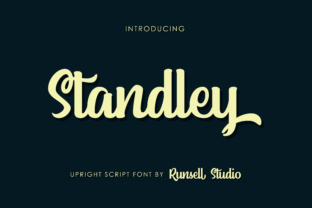
Standley
There are typefaces that simply work, and then there are those that make a statement. Standley falls firmly into the latter category. With its fluid, strong letterforms, it carries a weight and personality that can elevate a project from ordinary to memorable. But like any powerful tool, using it well requires more than just picking it and hoping for the best. Many people make avoidable mistakes that undermine the very qualities that make Standley appealing. The goal here is to help you sidestep those errors and use this typeface with confidence and precision.
Overestimating Versatility in Every Context
A common mistake is treating Standley as a universal fit for any visual communication. Its bold, fluid strokes feel authoritative, but that same strength can work against you in the wrong environment. Using it for an academic paper, a dense landing page meant for quick scanning, or an internal memo can create friction instead of clarity. The reader may feel overwhelmed by the personality of the typeface, especially when the content itself demands neutrality and simplicity.
The consequence is often reduced readability and a mismatch between tone and purpose. A reader trying to absorb detailed instructions or statistical data does not benefit from letterforms that demand attention purely by their design. To avoid this, save Standley for work where expression matters as much as information. Brand headlines, logos, poster titles, packaging, and short-form hero text are natural homes for it. Reserve your neutral sans-serifs or straightforward serifs for body text and informational layouts, and let Standley lead where it can shine without competing against the message.
Mispairing with Other Fonts
Even experienced designers sometimes pair fonts based on personal taste alone, without considering structural compatibility. Standley possesses a distinct rhythm and weight distribution. Slapping it next to a generic system font or an overly decorative script often produces visual chaos. The most common misstep is pairing it with a typeface that echoes the same levels of flourish or motion, resulting in two hungry fonts fighting for attention.
That visual tension creates a disjointed reading experience, where the hierarchy breaks down and users spend more time deciphering layout than understanding content. Instead, approach pairing strategically. Look for a quiet, highly legible typeface with neutral proportions to let Standley speak. A clean sans-serif with excellent readability, like Open Sans, Lato, or even something with narrower letter spacing, will ground the composition. The goal is contrast without conflict. Standley provides the character; your secondary face should provide the clarity. Test your pairing at different sizes and on different screens before settling.
Disregarding Context and Audience Expectations
Another oversight involves ignoring where and by whom the content will be consumed. Standley has a vintage-modern hybrid quality, a nod toward handcrafted lettering that feels nostalgic yet fresh. But if you are designing for a corporate audience expecting sleek minimalism or for a high-traffic utility app where speed is king, Standley can feel out of place. Audience expectations are not about limiting creativity—they are about respecting the relationship between design and communication.
When the aesthetic contradicts the context, credibility slips. A financial services update set in Standley may strike viewers as unserious or careless, even if the content inside is sound. Before committing, ask yourself whether the typography supports or distracts from the purpose of the communication. If your audience values tradition, warmth, and artistic flair, Standley may be perfect. If they value speed, clarity, and efficiency above all else, reconsider its role or limit usage to the most expressive element of the design.
Misjudging Readability at Small Sizes
One of the more subtle traps lies in using Standley at text sizes where its graceful curves and heavier strokes become liabilities. At 12 or 14 pixels on a screen, details vanish, counters close up, and the overall texture turns muddy. The same problem occurs in print when font size dips below 10 points. Readers will not always know why the text feels hard to read, but they will move on quickly.
This mistake undermines user satisfaction and can hurt engagement metrics, especially if the text is essential to understanding a product, service, or call to action. The remedy is straightforward: use Standley at display sizes. Think 24 points and upward, where its traits remain crisp and legible. For smaller labels, captions, or footnotes, switch to a partner typeface that handles compression well. If you must use Standley at smaller sizes, consider increasing letter spacing slightly or using a semi-bold weight instead of the full bold to preserve openness.
Ignoring File Formats and Licensing Requirements
Downloading a typeface without verifying the license is a mistake with real consequences. Standley is no exception. Whether you find it as a free download, part of a subscription, or a standalone purchase, the license dictates where you can install it, how many users can access it, and whether it is permitted for commercial use, embedding in apps, or using on a web server. Overlooking this can lead to legal exposure, revoked access, or having to redesign a project after launch.
Many people assume that buying a license once covers all uses, but that is rarely true. Desktop licenses often forbid web use, and web licenses may cap page views or restrict offline usage. To avoid this headache, read the terms before purchasing. If the project involves multiple environments—print, web, mobile app—look for a comprehensive license or purchase each needed version. Keep records of your licenses, and when in doubt, contact the foundry directly. Small upfront diligence prevents large headaches later.
Undervaluing the Role of Hierarchy in Typography
Even a beautiful typeface fails if every element on the page demands equal attention. When people use Standley for both headings and subheadings, and then again for short body segments, the composition flattens. The viewer does not know where to look first. The fluid strength that makes Standley perfect for a main title becomes noise when repeated without variation in size, weight, or spacing.
The effect is visual fatigue and impaired communication. Users skim less effectively, and the key point may disappear into the visual noise. Build hierarchy deliberately. Let Standley dominate in one or two sizes for primary messages. Use a complementary typeface for secondary elements, or if you want a monochrome approach, choose a lighter weight or smaller size within the same family. Introduce adequate space between elements. Emphasize what matters most through scale, not just repetition.
Choosing the Wrong Weight or Style
Standley often comes in multiple weights, but not every option works equally well for every purpose. A common error is defaulting to the boldest or most ornamental variant because it looks best in previews. On a poster or hero image that might be fine, but in a layout with multiple tiers of information, heavier weights can crowd the page and reduce contrast between levels.
Readers struggle to differentiate between headings and body copy when the weight difference is negligible. Clarity and satisfaction both drop. Avoid this by selecting weights intentionally. Use the strongest, most expressive weight only for the primary headline. Step down one or two levels for subheadings, and never use decorative weights for paragraphs. If the family includes a regular or book weight, that often works best for brief descriptive text. Test the hierarchy with a grayscale view to confirm that each level is distinct.
Neglecting to Test on Real Screens and Paper
Previewing Standley in a design tool is useful, but it is not the same as seeing it in the final medium. Screen calibration, paper texture, and ambient lighting all influence how a typeface appears. Some designers finalize a layout based on what looks good on their monitor, only to discover that the font becomes heavy or loses contrast when viewed on a phone or printed on matte stock.
This mismatch can derail an otherwise solid design, leading to reprints, poor user reviews, or frustrated stakeholders. To prevent this, test early and often. Print physical samples on the paper you intend to use. View designs on multiple devices, including an older phone screen that may lack retina clarity. Adjust weight, size, and spacing based on real observations, not just tool previews. Respect the medium, and Standley will reward you with consistent performance.
Rushing Without a Typography Strategy
One of the most pervasive mistakes is approaching font selection as an afterthought. Many designers choose Standley because it looks good in isolation, but they fail to consider how it will function within a broader system. Without a strategy, usage becomes inconsistent across pages, materials, and campaigns. The font’s personality becomes diluted rather than reinforced.
This erodes brand cohesion and makes the entire project feel less deliberate. Whether you are a freelancer working on a single brochure or a small business owner redesigning your website, build a typography plan before you commit. Write down where Standley will appear, what sizes and weights you will use, and what its supporting typefaces will be. Document these decisions and share them with anyone working on the project. Following a plan does not stifle creativity; it ensures your creative choices add up to something coherent.
Final Perspective
Standley is a typeface with real presence, a tool that can set the tone and capture attention. Its fluid, strong letters deserve to be used with intention. By avoiding the common missteps around context, pairing, sizing, licensing, hierarchy, and testing, you give your projects the best chance to look polished and purposeful. Approach your next project not just with a font in mind, but with a clear understanding of how it will serve your message. That is when Standley works best—not as decoration, but as an essential part of your communication.