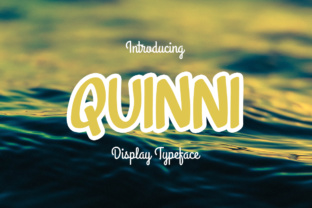
Quinni: A Freestyle Display Font for Bold Projects
Every creative project hits a moment when it needs a spark. You have the layout, the colors, the imagery, and yet something feels flat. The typeface you chose isn't carrying the weight you expected. That is where Quinni comes in. It is a freestyle display font that brings energy, character, and adaptability to work that might otherwise blend into the background. Whether you are designing a poster, building a brand identity, or crafting social media assets, Quinni offers a playful but purposeful alternative to safer, more conventional fonts.
What Makes Quinni Different
Quinni is not trying to be invisible. It is the opposite of a neutral body text font. Its freestyle nature means each letterform carries a sense of movement and spontaneity. The curves are not rigid, the proportions are not uniform, and that is exactly the point. A freestyle display font like Quinni works because it feels human. It suggests a hand at work, an idea in progress, a design that breathes. That quality is hard to manufacture with more mechanical typefaces.
When a project feels drab, it is often because the visual language has become too predictable. Quinni interrupts that predictability. It shifts the tone from safe to expressive without sacrificing legibility. You can still read it clearly at display sizes, but the reading experience is warmer and more engaging. That balance makes it useful across a range of creative contexts.
The Freestyle Advantage in Practice
Freestyle fonts often get categorized as decorative, as if they are only useful for special occasions. But Quinni challenges that assumption. Its versatility comes from its looseness. You can scale it up for headlines where you want personality, or use it in shorter bursts for logos, badges, and accent text. The irregular geometry draws attention without screaming. It invites the viewer to look closer.
For designers who work with clients who ask for something different but cannot articulate what different looks like, Quinni provides a clear option. You can present it as an alternative to script fonts that can feel too ornate, or to sans-serif fonts that can feel too cold. It occupies a middle ground that is rare in type design: readable but expressive, bold but approachable.
Creative Applications Across Formats
One of the strongest arguments for adding Quinni to your toolkit is how well it adapts to different formats. It is not a one-trick font. The same typeface that energizes a music festival poster can lend warmth to a café menu or a product packaging label. What changes is how you support it with layout, color, and spacing.
Branding and Logo Work
Small business owners and entrepreneurs often struggle to find a typeface that feels unique without looking amateurish. Quinni works well here because its freestyle quality reads as intentional. It does not look like a default option. For a boutique shop, a freelance creative, or a local event series, Quinni can anchor a visual identity that feels handcrafted. Pair it with a simple sans-serif or a clean serif for body text, and you have a system that feels curated rather than random.
When using Quinni in a logo, keep the surrounding elements minimal. Let the font carry the personality. Avoid adding too many decorative shapes or competing textures. The letterforms themselves provide enough visual interest. A simple lockup with the business name in Quinni and a restrained color palette can communicate warmth, creativity, and confidence all at once.
Social Media and Digital Content
Marketers and content creators working in digital spaces face a constant challenge: how to stop the scroll. Quinni can help. Used in Instagram story titles, YouTube thumbnail text, or LinkedIn banner headlines, it breaks the monotony of standard system fonts. Because it feels less corporate, it resonates with audiences looking for authenticity. A quote graphic set in Quinni feels personal. An announcement set in Quinni feels like news worth reading.
For digital use, pay attention to contrast. Quinni has a lively stroke variation, so placing it on a busy background can reduce readability. Stick to solid backgrounds or subtle gradients. White or light text on a dark background often gives Quinni room to breathe. If you are working with smaller screen sizes, use Quinni for short phrases only. Save longer paragraphs for simpler companion fonts.
Print Collateral and Editorial Design
Print projects benefit from Quinni's physicality. On a poster, a flyer, or a zine cover, the freestyle shapes feel tactile even in digital reproduction. The slight irregularities in the letterforms mimic the charm of hand-lettering without requiring hours of manual work. Educators, publishers, and hobbyists creating print materials can use Quinni to add personality without needing advanced design skills.
For editorial layouts, use Quinni sparingly. A single drop cap, a pull quote, or a section title in Quinni can add contrast and rhythm to a text-heavy page. The rest of the layout can remain clean and structured. That contrast between orderly body text and expressive display type creates visual hierarchy that guides the reader naturally.
Adapting Quinni for Different Audiences
No single font works for every audience, but Quinni covers more ground than you might expect. Its freestyle character appeals to younger, trend-aware demographics. Millennials and Gen Z audiences often respond well to typefaces that feel less formal and more personal. For these groups, Quinni signals that a brand or creator is in touch with current visual culture.
At the same time, Quinni does not feel childish or gimmicky. That makes it suitable for audiences that value creativity but also need professionalism. A small business targeting local customers, a freelancer building a personal brand, or a creative agency showcasing portfolio work can all use Quinni without looking unpolished. The key is context. When paired with thoughtful layout and consistent color use, Quinni reads as sophisticated and playful at the same time.
Practical Adjustments for Better Fit
If you are worried about Quinni feeling too loose for a particular project, make small adjustments. Increase letter spacing slightly to give each character more room. That can tone down the freestyle energy and make the font feel more refined. Alternatively, decrease tracking for a tighter, more compressed look that amplifies the boldness. Experimenting with weight and scale also changes the personality. A larger size emphasizes the hand-drawn quality, while a smaller size makes the font feel more controlled.
Color choice matters too. Quinni in a muted earth tone reads differently than Quinni in a bright neon. Match the color temperature to the mood you want to create. Warm colors enhance the approachable feel of the font. Cool colors give it a modern, slightly edgy twist. The same font can shift between friendly and dramatic with a simple palette change.
Keeping Results Clear and Effective
Freestyle fonts sometimes get a reputation for being hard to control. That reputation comes from misuse, not from the font itself. Quinni remains effective when you respect its limitations. Use it at display sizes where its details can be appreciated. Avoid setting long reading passages with it. Do not layer it over complex imagery. Keep the background simple, and let the letterforms do the work.
Consistency also matters. If you use Quinni in a project, commit to it. Do not switch to a different display font halfway through because you want variety. The power of a freestyle font like Quinni is in its recognition. When viewers see it repeatedly across your materials, it becomes part of your visual identity. That repetition builds trust and recall.
For teams and collaborators, document how Quinni should be used. Note the minimum size for readability, the preferred color combinations, and the types of content where it works best. This prevents the font from being applied in ways that dilute its impact. A small style guide keeps everyone aligned and preserves the original creative intention.
Practical Inspiration for Your Next Project
If you are still unsure where to start, consider these project ideas that naturally suit Quinni:
- A workshop or event series title page where the font's energy signals participation and creativity.
- A product launch announcement for a handmade or artisanal brand where authenticity matters.
- A personal website hero section for freelancers or consultants who want to stand out.
- A limited edition packaging label for a small-batch product where every detail counts.
- A mood board title for client presentations that need to communicate a creative direction quickly.
Each of these scenarios benefits from a font that feels fresh and intentional. Quinni gives you that without requiring elaborate typographic treatments. You can place it on the page and it already looks like a decision was made.
Testing and Iteration
Before committing Quinni to a final design, test it in context. Set the same word or phrase in Quinni and in a few other display fonts. Compare how each one changes the tone of the layout. Often, seeing the alternatives makes the strength of a freestyle font more obvious. It is not just about being different. It is about being right for the message.
Ask someone unfamiliar with the project to look at your design and describe the tone they perceive. If they use words like energetic, warm, creative, or approachable, Quinni is working. If they find it distracting or hard to read, consider adjusting size, spacing, or background support. Small tweaks can change the reception significantly.
Final Thoughts on Working with Quinni
A font like Quinni exists to solve a specific problem: the feeling that your project is missing something you cannot name. That missing element is often personality. Quinni provides it freely, without requiring elaborate design systems or advanced typography skills. It works for designers, marketers, small business owners, educators, and hobbyists alike. The requirements are simple. Use it at the right size, give it clean backgrounds, and let it lead the visual tone.
Finding your project a bit drab happens to everyone. Consider Quinni your lifesaver not because it will fix every layout problem, but because it gives you a clear, expressive tool for injecting energy into work that needs it. The best creative tools are the ones that open up possibilities without adding complexity. Quinni does exactly that. Try it on your next project and see how much a single typeface can change the feel of your work.