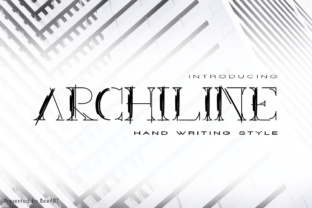
Archiline: A Hand Scratched Display Font for Real Design Workflows
Choosing the right typeface is rarely a decision made in isolation. It sits at the intersection of message, audience, format, and intent. When a project calls for something raw, personal, and visibly crafted, a display font like Archiline becomes more than a stylistic choice—it becomes a functional asset in your production pipeline. This hand scratched typeface, available in both regular and italic styles, offers a distinct aesthetic that fits neatly into a wide range of projects. But understanding where and how to use it effectively requires a practical look at its role within a broader creative or business process.
What Archiline Brings to a Project
At its core, Archiline is a display font designed to command attention. The hand scratched quality gives it an organic, imperfect texture that feels human. This is not a neutral workhorse typeface for body copy. It is a tool for headlines, titles, logos, packaging, posters, social media graphics, and any environment where the visual voice of the text matters as much as the words themselves. The inclusion of a regular italic variant adds flexibility, allowing you to create hierarchy and emphasis without leaving the same visual family.
The value of Archiline lies in its ability to communicate effort. In a world where digital perfection is the default, a hand scratched aesthetic signals authenticity, craftsmanship, and a deliberate creative choice. That makes it suitable for projects where brand personality, emotional resonance, or narrative tone are central.
Where Archiline Fits in a Creative Workflow
Integrating a font like Archiline into your process is not about forcing it into every project. It is about recognizing the moments where its characteristics solve a specific visual problem. Think of your workflow not as a linear checklist, but as a series of decisions about communication intent. Archiline becomes relevant at several points along that chain.
Before the Project: Planning the Visual Direction
During the planning phase, you are defining the tone, audience, and medium. If the project requires a handmade, rugged, or expressive feel, Archiline can be part of the mood board or style tile from the start. Ask yourself whether the message benefits from a texture that suggests ink, pencil, or scratched surface. If your audience values authenticity—such as in craft branding, independent publishing, music merchandise, or event posters—then Archiline belongs in your initial typeface shortlist.
This early consideration saves time later. When you choose a font that aligns with the project's emotional goals from the beginning, you avoid the costly process of retrofitting a mismatched aesthetic. Archiline works well alongside neutral sans-serif or serif typefaces for body text, so planning its pairing early ensures a cohesive system.
During the Project: Execution and Asset Creation
Once the project moves into production, Archiline becomes a direct tool for creating visual assets. Use it in headline treatments, hero text, or key messaging that needs to break through visual noise. The regular style works well for primary titles, while the italic variant adds motion and emphasis for subheadings or callout phrases. Because it is a display font, keep it at larger sizes where the hand scratched details remain legible and impactful.
In practical terms, Archiline integrates with standard design software—Adobe Illustrator, Photoshop, InDesign, Figma, Canva, and similar tools. There are no special technical requirements. Load it into your font management system, apply it to text layers, and adjust tracking and kerning as needed. The hand scratched texture means that some letterforms may have irregular spacing; manual adjustment at larger sizes can improve readability and visual balance.
When working on multi-page documents or multi-asset campaigns, consistency matters. Decide on a hierarchy: perhaps Archiline Regular for main headers, Archiline Italic for secondary headers or emphasis, and a clean sans-serif for body copy. Document this hierarchy in your project style guide so that every team member applies it the same way.
After the Project: Review and Iteration
After the design is delivered, evaluating how the font performed in context is a step that many skip. Did the hand scratched texture hold up at the sizes and resolutions required? Did the italic variant provide enough contrast for hierarchy? Was the overall readability appropriate for the medium—print, digital, video, or outdoor?
These observations feed back into your personal or team library. Over time, you build a practical understanding of when Archiline delivers and when it falls short. That knowledge makes your future planning faster and more accurate. If a client or stakeholder questions the choice, you have concrete reasoning based on prior outcomes, not just aesthetic preference.
Practical Implementation Tips for Archiline
Getting the most out of Archiline means treating it as a specialized tool with specific best practices. Here are several observations drawn from real use cases.
Pairing with Other Typefaces
Archiline is a display font, so it needs a companion for body text. Look for neutral, clean typefaces that do not compete with its texture. Sans-serif families like Open Sans, Lato, or Montserrat work well because they provide contrast without conflict. For a more refined feel, a light-weight serif like Garamond or Merriweather can create an interesting tension between rough and polished. Test pairings at actual sizes before committing.
Managing Legibility in Different Contexts
Because Archiline mimics a scratched or hand-drawn look, it can lose clarity at small sizes or low resolutions. Use it at 24 points or larger for print, and at equivalent sizes for digital. For web or app interfaces, consider using it only for hero sections or fixed headlines where you control the rendering environment. In video or motion graphics, test how the texture reads at various durations and backdrop complexities. A simple, solid-color background usually keeps the letterforms readable.
Using the Italic Style Purposefully
The italic variant of Archiline is not just a slanted version. It carries its own energy and can be used to signal movement, urgency, or emphasis. In a poster, use the italic for a tagline or a dynamic phrase. In a logo, the italic can suggest forward momentum. But avoid overusing both styles in the same layout—too much texture can overwhelm the viewer. One dominant style per section is a safe rule.
Maintaining Consistency Across Assets
If your project includes multiple deliverables—social media graphics, print ads, website headers, merchandise—apply Archiline in a consistent role across all of them. For example, always use it for the product name or campaign slogan, and never for secondary information. This builds visual continuity and reinforces brand recognition. Create a simple specification sheet that notes font, style, size range, and color treatment for each asset type.
Integration with Broader Tools and Methods
No font operates in a vacuum. Archiline interacts with your color palette, imagery, layout grid, and production format. A rugged hand scratched typeface might pair naturally with high-contrast black-and-white imagery, or with textures like paper grain, chalkboard, or concrete. Conversely, it can create striking juxtaposition when placed over clean, minimalist photography or smooth gradients. Think of the font as one element in a system, not a standalone decoration.
In team environments, sharing font files and usage guidelines becomes essential. Store Archiline in a shared cloud folder or use a platform like Google Fonts (if available) or a commercial font hosting service. Document license restrictions so that everyone uses it legally and consistently. If you work with developers, provide CSS code snippets with fallback fonts so that the typography degrades gracefully if the font fails to load.
For entrepreneurs and small business owners who manage their own design, Archiline can be a defining element of brand identity. Using it consistently across packaging, website headers, and social media creates a cohesive look without needing a full branding overhaul. Pair it with a simple color palette and one secondary typeface, and you have a system that scales without constant redesign.
Long-Term Use and Quality Control
A font like Archiline is not a seasonal trend. Its hand scratched quality connects to a broader preference for authentic, human-centered design that persists across industries. Over the long term, you may find yourself returning to it for specific use cases: annual event branding, product launches, limited edition packaging, or creative campaigns where the audience expects something less polished.
To keep your use of Archiline effective over time, periodically review how it has been applied. If you notice it appearing in contexts where readability suffers or where the texture no longer aligns with the brand direction, consider whether a lighter weight or different display font might serve better. Archiline works best when reserved for moments that benefit from its personality—not as a default choice.
Quality control also means checking how the font renders across different output methods. A hand scratched texture that looks excellent on a screen at 100% zoom may appear too rough when printed at a large format, or too faint if printed at a small size. Always produce a physical or high-resolution proof before finalizing a project that uses Archiline in a prominent role.
Final Observations on Workflow Fit
Archiline is a purposeful tool for designers, marketers, and creators who value texture and authenticity. It is not a universal solution, and it does not need to be. Its strength lies in its specificity. When your project requires a voice that feels drawn by hand, scratched into a surface, or marked with deliberate imperfection, Archiline delivers that quality reliably and with stylistic range through its regular and italic forms.
Integrating it into your workflow is straightforward if you plan ahead, pair it wisely, and control its application through clear guidelines. Whether you are a freelancer building a brand from scratch, a marketer developing a campaign system, or a publisher designing a limited edition cover, Archiline gives you a distinctive visual anchor that communicates effort and intention. Use it where it belongs, and your projects will carry a consistency and character that generic typefaces cannot match.