Hearts and Roses: A Handcrafted Font for Real Workflows
Typography is rarely an afterthought for those who build brands, design materials, or communicate visually. It sets tone, guides readability, and reinforces identity. Hearts and Roses, a handcrafted font created by Creativeqube, offers a distinctive aesthetic that sits comfortably between decorative charm and practical usability. Understanding where this font fits into a broader process—from project planning to final delivery—can help you use it deliberately rather than decoratively.
What Hearts and Roses Is and Where It Belongs
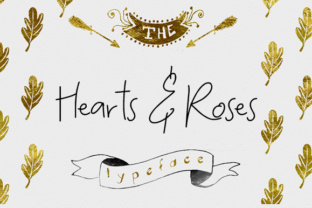
Hearts and Roses is a hand-drawn, script-style typeface designed with visible texture, uneven stroke weight, and organic curves. It does not mimic digital perfection. Instead, it captures the feel of ink on paper, making it suitable for projects where a human, personal, or romantic tone is needed. Its character set includes uppercase and lowercase letters, numerals, and basic punctuation, which means it can handle short headlines, pull quotes, logos, and accent text without requiring supplemental fonts for every use case.
In a workflow context, Hearts and Roses is not a body-text font. It is a display font. Recognizing this distinction early saves time during layout planning. If you are designing a wedding invitation, a greeting card, a social media graphic, or a product label that needs warmth, this font becomes a primary visual element. If you are drafting a long-form article or a business report, it serves as a decorative accent—perhaps for a chapter opening or a section divider.
Before the Project: Preparation and Selection
Choosing a font like Hearts and Roses should happen during the asset selection phase of a project, not after the layout is complete. When you know the tone you want to communicate—romantic, nostalgic, handmade, or intimate—this font can guide your color palette, paper choice, and supporting typography.
Consider compatibility early. Because Hearts and Roses has a strong personality, it pairs best with neutral, clean sans-serif or serif fonts. For example, using it with a simple geometric sans like Montserrat or a classic serif like EB Garamond creates contrast without competition. Before you start designing, test a few pairings in a mockup file. This saves you from reworking layouts later.
Licensing is another preparatory step. Creativeqube offers Hearts and Roses under a standard desktop license, which covers most personal and small business projects. If you plan to use it in商品 packaging, digital products, or merchandise, check the license terms for commercial use. This simple check prevents legal friction after you have invested time in design.
During the Creative Process: Integration and Application
Once your project is underway, Hearts and Roses can be applied in several distinct roles that each affect workflow differently.
Headlines and Titles
When used for a main headline, the font commands attention. Because of its handcrafted nature, it works best at larger sizes—typically 36 points or above. At smaller sizes, the uneven strokes and loops can become muddy, especially on low-resolution screens. Keep this in mind if your output includes digital formats like Instagram posts or email headers. For print, the texture translates well, but test at actual print size before finalizing.
Logos and Brand Marks
Hearts and Roses can serve as the basis for a logotype, especially for brands in the wedding, lifestyle, stationery, or personal care space. However, a font alone is rarely a finished logo. Plan to adjust letter spacing, scale, and possibly modify a character or two to make it unique. A font like this gives you a strong starting point, but you still need to refine it within your branding guidelines.
Accents and Decorative Elements
Using the font for short phrases, pull quotes, or section headings adds personality without overwhelming the page. In a booklet, for instance, you might set chapter titles in Hearts and Roses and the body text in a clean serif. This creates hierarchy and visual rhythm. When applied this way, the font becomes a punctuation mark in your layout—used sparingly but intentionally.
After the Design: Output and Quality Control
Once your project is designed, output testing becomes crucial. Hearts and Roses, like many handcrafted fonts, can behave differently depending on the rendering engine. On screen, check for anti-aliasing artifacts, especially around thin strokes or tight curves. In print, request a proof or print a sample at full size to see how the ink reproduces the font's texture.
If you are exporting for web or social media, consider converting the text to outlines or using an SVG format if your platform supports it. This preserves the font's appearance regardless of whether the end user has it installed. For PDFs, embedding the font ensures consistent display across devices.
Quality control also means checking readability. Ask someone unfamiliar with the project to read the text aloud. If they hesitate on certain letters or words, adjust size, spacing, or weight. No amount of aesthetic appeal compensates for illegible communication.
Practical Implementation Tips from Real Use
Over time, users of Hearts and Roses have developed small habits that improve consistency and efficiency. Here are a few worth adopting:
- Create a style guide snippet. Before using the font across multiple files, set up a sample document showing the font at various sizes, with your chosen pairings, and with common letter combinations. This becomes a reference that speeds up future projects.
- Adjust tracking manually. Handcrafted fonts often have uneven spacing between letter pairs. In software like Adobe Illustrator or Canva, you may need to kern specific pairs—like "Wa" or "oo"—manually. This takes a few minutes but dramatically improves polish.
- Use it in limited color palettes. Hearts and Roses already carries visual texture. Adding too many colors competes with that texture. Sticking to one or two colors—like a deep rose and a neutral background—keeps the design cohesive.
- Keep a backup font. If you are collaborating with others who may not have the font installed, provide a fallback that closely matches the width and weight. This ensures the layout holds together even if the font fails to load.
How Hearts and Roses Interacts with Other Tools and Assets
Typography never works in isolation. Hearts and Roses interacts with your design software, your image assets, your brand colors, and even your paper stock if you are printing.
In Adobe Photoshop or Illustrator, the font responds well to layer effects like subtle drop shadows or soft glows, but avoid heavy distortion. Warping or stretching destroys the hand-drawn quality. In Canva, the font integrates cleanly, but check that the version you upload matches the official file—some automated uploads alter spacing. In web design, use a @font-face declaration with proper fallbacks and test on mobile devices where rendering varies.
When paired with illustrations or icons, Hearts and Roses works best with line art, botanical drawings, or minimalist graphics. Busy or photorealistic images compete with the font's texture. Keep supporting visuals simple so the typography remains the focal point.
Organizing Your Font Library for Long-Term Use
If you manage multiple projects, organization matters. Hearts and Roses should be stored in a clearly labeled folder alongside its license file, readme, and any alternate versions. Many users find it helpful to create a "display fonts" subfolder and tag fonts by mood or use case—for example, "romantic," "handmade," or "wedding." This makes retrieval faster when you start a new project.
For team environments, use a shared cloud folder or a font management tool like FontBase or RightFont. This ensures everyone accesses the same version and licensing terms. A small step like this prevents version mismatches and keeps your workflow consistent across collaborators.
Efficiency and Consistency Across Multiple Projects
Freelancers and small business owners often reuse design elements across projects. Hearts and Roses can become part of a reusable template kit. For example, if you design save-the-date cards regularly, create a template with the font preloaded, your preferred pairings set, and placeholder text formatted. This cuts setup time for each new client and ensures brand consistency if the client returns for additional items.
Consistency also applies to spacing and sizing. Once you settle on a minimum size for readability (around 24 points for short phrases, 36 points for headlines), stick with it across projects unless the medium demands adjustment. Keeping these parameters documented saves you from re-deciding every time.
Observations on Long-Term Use and Reliability
Fonts that rely on a strong stylistic voice sometimes feel dated after a few years. Hearts and Roses, because it is based on a handcrafted rather than a trendy digital style, tends to age well. Its organic imperfections give it a timeless quality similar to classic script typefaces. However, its suitability depends on your brand or project context. For a floral shop or a wedding planner, it remains relevant year after year. For a tech startup or a corporate report, it feels out of place.
The font's file size is small, which helps with web performance and quick downloads. It installs without issues on both Windows and macOS. No special dependencies or additional software are required. This low-friction setup means you can go from download to first use in under a minute.
One practical long-term consideration: keep a backup copy of the font file in a separate location. If you upgrade your system or switch computers, having the original file avoids the need to repurchase or re-download. This is a simple habit that prevents disruptions years down the line.
Final Thoughts on Integration
Hearts and Roses by Creativeqube is more than a decorative option. It is a tool that, when chosen with intention, can elevate a project's emotional tone and visual hierarchy. Whether you use it before the project starts to set direction, during the design phase to create contrast and emphasis, or after delivery as part of a reusable asset library, its value comes from how you integrate it into your broader process.
Typography decisions are process decisions. By treating Hearts and Roses as a deliberate element within your workflow—selecting it early, pairing it thoughtfully, testing it thoroughly, and organizing it for reuse—you turn a handcrafted font into a reliable part of your creative toolkit. That is the difference between simply using a font and using it well.